

Compare audiences with Overlap Analysis
See duplication before you activate
Overlap Analysis compares the current audience with one or more compatible audiences. It separates records found only in each audience from records found in both, and can turn those segments into a new audience.
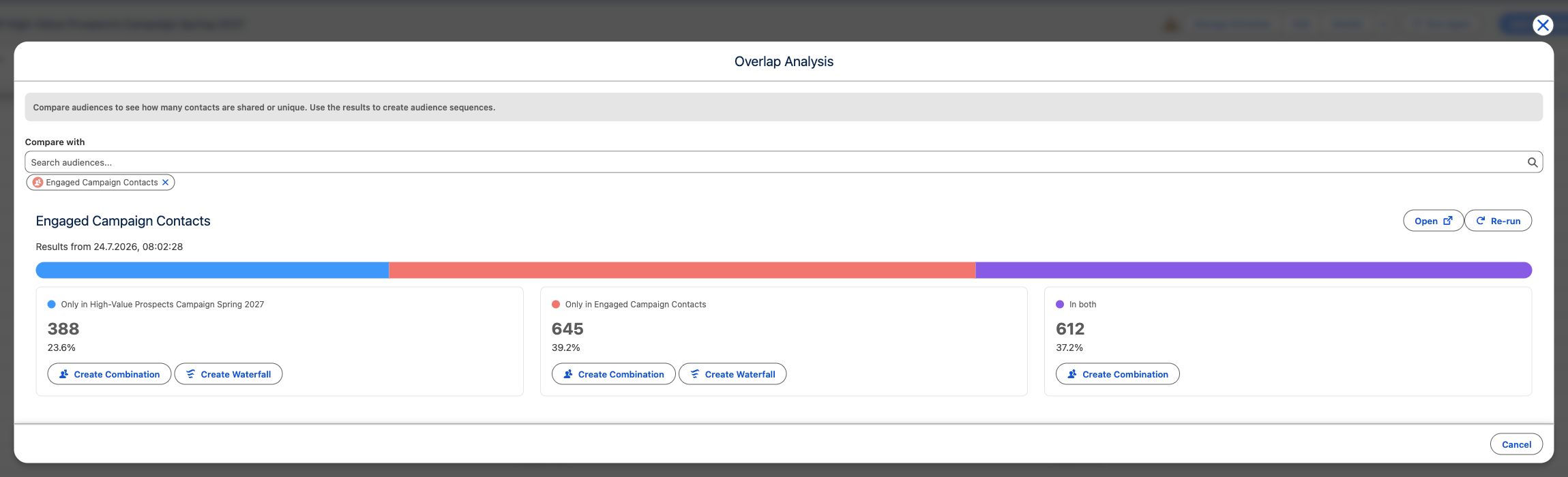
Compare audiences
Section titled “Compare audiences”- Run and open the audience you want to use as the starting point.
- Open the results action menu and select Overlap Analysis.
- Under Compare with, use Search audiences… to add one or more audiences with the same initial object type.
- Review Only in … for each audience and In both. Each segment shows a record count and its percentage of all unique records in the pair.
The result timestamp appears as Results from …. If the compared audience has not run, select Run Audience. If its results expired, select Re-run. Large comparisons continue in the background; you can leave the modal, and CAB sends a completion notification with a return link when the comparison is ready.
Create an audience from a segment
Section titled “Create an audience from a segment”- Select Create Combination on any non-empty segment to create an audience containing that set: only the current audience, only the compared audience, or their intersection.
- On an Only in … segment, select Create Waterfall to create an ordered audience in which the first audience is excluded from the second.
- Confirm the generated Name, then select Confirm.
The comparison also shows Previous Actions from the compared audience, including campaign additions, splits, integration actions, and final actions. This helps you distinguish membership overlap from audiences that may already have been contacted.