

Make an entry configurable
Share one definition while each audience picks its own value
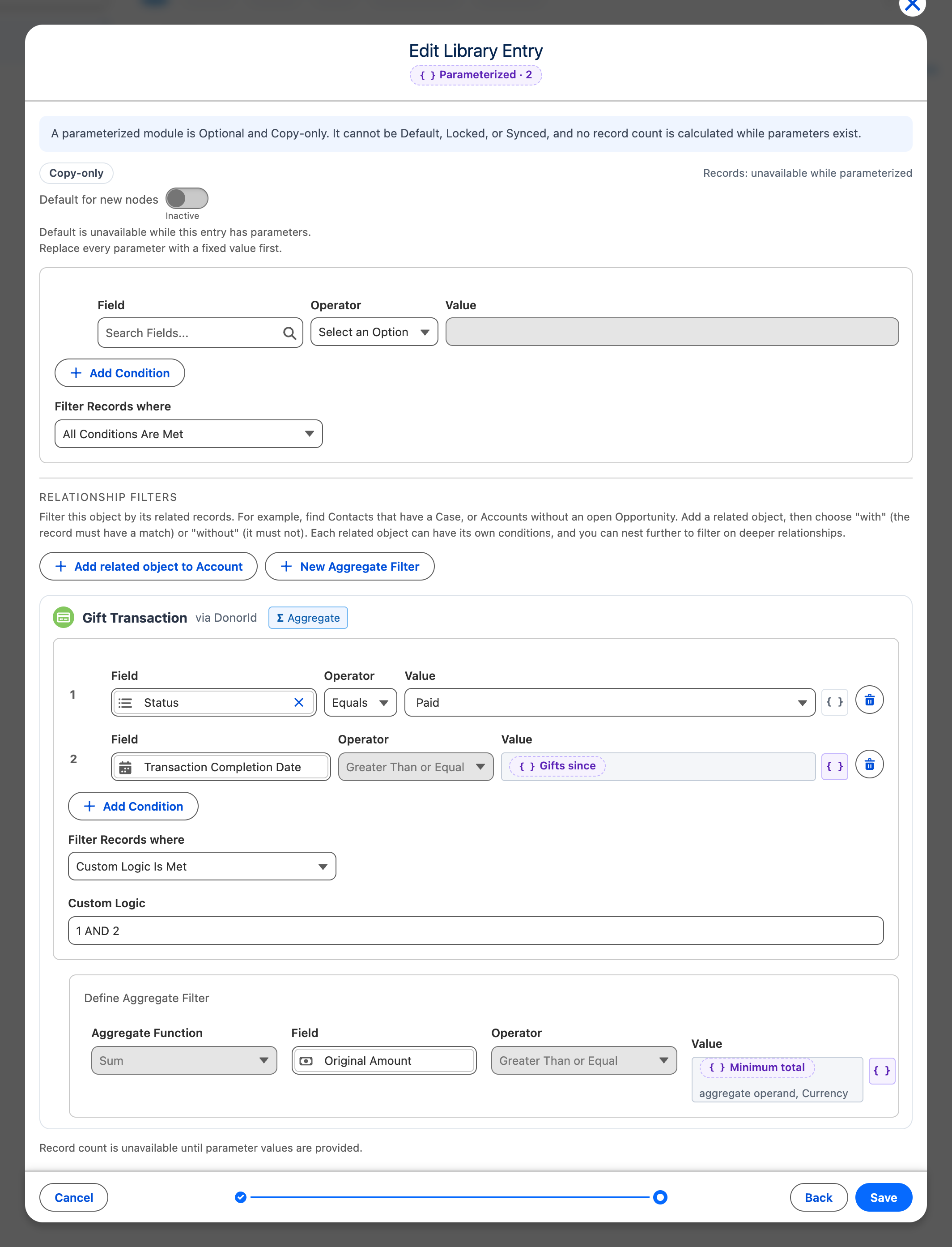
Some filters are the same in every audience except for one value. “Major donor households” always adds up paid gifts since a date, but one campaign needs €1,000 and another €5,000. Instead of one entry per amount, make the amount a parameter. Builders then fill it in when they add the entry. See Fill in a configurable entry.
Turn a value into a parameter
Section titled “Turn a value into a parameter”- On Filters & Options, set the field and the operator of the condition.
- Select the { } button next to the value. Its name is Value or parameter.
- Select + New parameter….
- Enter a Key and a Display label. Builders see the display label, for example “Minimum total”.
- Optionally enter Instructions (optional). They show wherever a value is asked for, so say what a good value is.
- Select Add parameter.
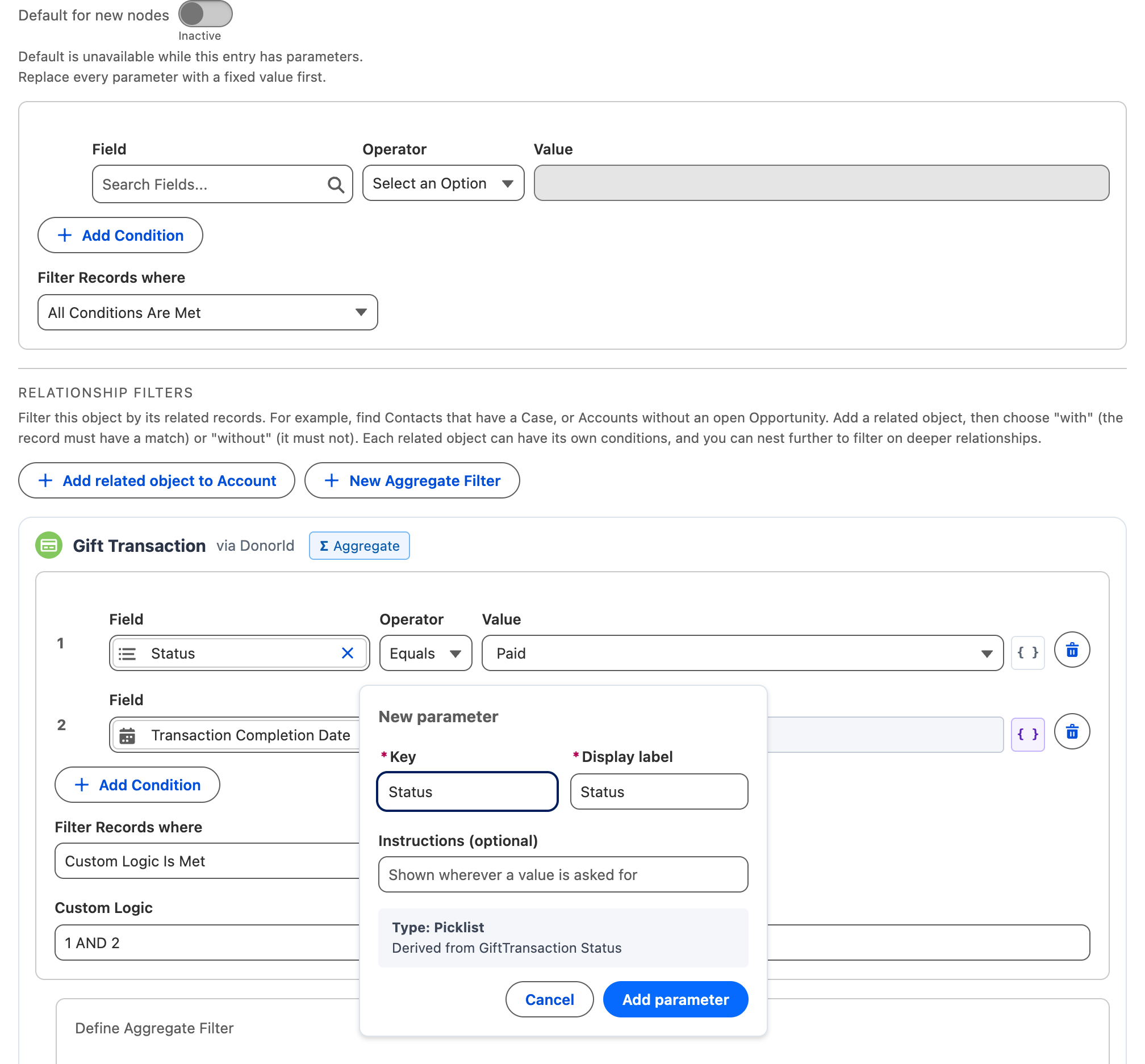
The value cell then shows the parameter, marked Needs a value. CAB takes the type of the parameter from the field: a picklist field gives a picklist parameter, a currency field a currency parameter, and so on. The panel shows the type before you add the parameter.
The same works for the value of a calculation under Define Aggregate Filter. The cell then says aggregate operand and the type.
To return to a fixed value, select { } again and choose Enter a value.
Use one parameter in several conditions
Section titled “Use one parameter in several conditions”When two conditions need the same value, for example the same date on two related objects, use one parameter for both. Select { } next to the second value. The menu lists the parameters that fit this field. Select one. The builder then enters the value once, and it fills every condition that uses the parameter.
The Parameterized · N badge at the top of the editor counts the parameters. Point to it to see every parameter, how many conditions it fills and where they are.
What stays fixed
Section titled “What stays fixed”A parameter replaces one value, nothing else. The object, the field, the operator, the related objects, the calculation and the condition logic stay as you saved them.
- A date parameter is either a calendar date or a relative date. You fix which one when you create the entry.
- The Count and Count Unique Values functions take a whole number.
- Every parameter is required. A builder cannot copy the entry with an empty value.
- An entry can have up to 10 parameters.
What changes for a configurable entry
Section titled “What changes for a configurable entry”- The list marks the entry Parameterized · N and Copy-only.
- CAB shows no record count, because the count depends on the values. The editor says Record count is unavailable until parameter values are provided.
- Default for new nodes is unavailable. To make a default entry configurable, turn the default off first.
- An entry that audiences sync or that an administrator locked cannot get parameters. Release or detach every use first. See Manage entries that are in use.
- When you replace the last parameter with a fixed value, the entry becomes a normal fixed entry again. It does not become a default by itself.
If you change the object of a new entry, or copy another filter into it, CAB asks before it replaces the conditions and every parameter. Cancel keeps the entry as it is.