

Filter by distance from a location
Build location-aware audiences
CAB can filter a Salesforce Location field by its distance from a point. Use it for audiences such as contacts within 25 km of an event, or accounts outside a service area.
Add a location condition
Section titled “Add a location condition”- In an object’s filter editor, choose a Location field.
- Choose Is Within to keep records inside a radius, or Is Not Within to keep records outside it.
- Enter the Distance and choose mi or km under Unit.
- Under from, enter the latitude and longitude in Location. You can also select Paste Coordinates and paste a value such as
50.264, 8.649. - Optionally enter a recognizable name in Location Description, then select Save.
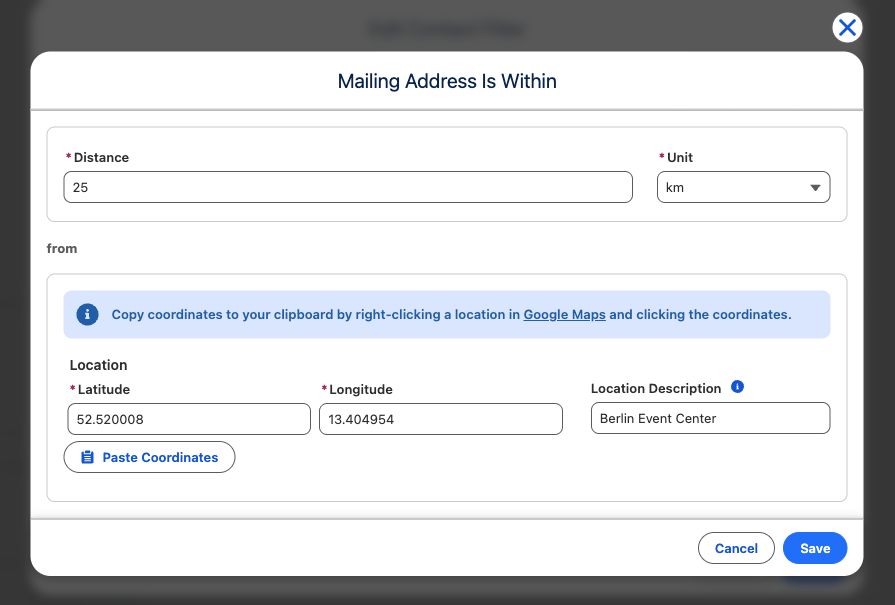
CAB defaults the unit to miles when the browser locale is en-US; other locales default to kilometers. The saved description is shown with the coordinates to make the condition easier to recognize.
Ask Cabby for a proximity audience
Section titled “Ask Cabby for a proximity audience”When Cabby’s location resolution is enabled, you can use a place name in a prompt—for example, “contacts near Berlin.” Cabby resolves that name to coordinates and creates the same kind of Location condition. Review the generated field, radius, unit, and point before applying it.