

Manage CAB Settings
Administer the app from one place
Open the CAB Settings tab to start required jobs and manage organization-wide CAB behavior. The interface is organized by administrative goal: Getting Started, Configure, and Maintain.
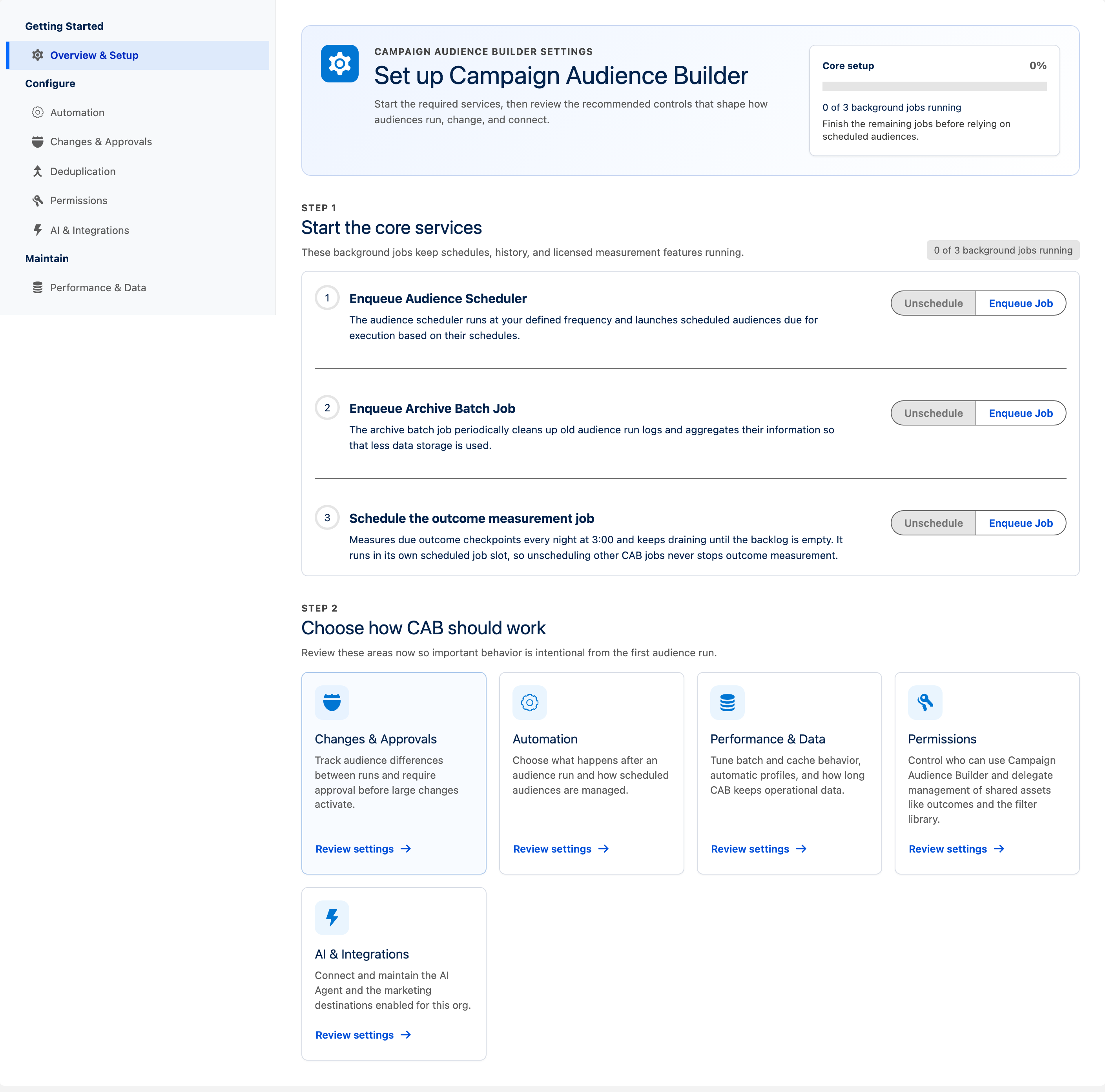
Find a setting
Section titled “Find a setting”| Navigation group | Page | What it controls |
|---|---|---|
| Getting Started | Overview & Setup | Required background jobs and setup progress. |
| Getting Started | Turn on Outcomes | The checklist that turns on Outcomes and gives people access. |
| Configure | Automation | Final Actions and scheduler behavior. |
| Configure | Changes & Approvals | Run-to-run change tracking and change-approval policy. The page header is Auditability & Governance. |
| Configure | Deduplication | Per-object rules that remove duplicate records from audience results. |
| Configure | Permissions | Who can use CAB, and who may manage shared assets. |
| Configure | AI & Integrations | Cabby, Account Engagement, and Marketing Cloud setup when those features are available. |
| Maintain | Performance & Data | Cache, result persistence, batch sizes, composition profiles, and retention. |
| Maintain | Outcome limits | The storage limit for Outcomes, how long measured people stay available, and the share of nightly background jobs Outcomes may use. |
| Maintain | Audience Query Diagnostics | Generated SOQL and large-data-volume filter risks when diagnostics are included in the edition. |
Only pages relevant to the enabled CAB edition and integrations are shown.
Start the core services
Section titled “Start the core services”On Overview & Setup, the Core setup panel tracks how many of the available background jobs are running:
- Start the audience scheduler: the scheduler launches scheduled audiences as they come due. Use Start to start it and Unschedule to stop it.
- Start the archive job: the archive job cleans up old audience run logs and applies the configured retention limits.
Outcomes has its own nightly update, which you turn on under Turn on Outcomes. See Turn on and manage Outcomes.
Choose how CAB should work
Section titled “Choose how CAB should work”Below the core services, Choose how CAB should work links to the areas worth deciding before the first audience run. Each card opens its page with Review settings:
- Changes & Approvals — track differences between runs and require approval before large changes activate.
- Automation — choose what happens after an audience run and how scheduled audiences are managed.
- Performance & Data — tune batch and cache behavior, automatic profiles, and how long CAB keeps operational data.
- Permissions — control who can use CAB and delegate management of shared assets.
- AI & Integrations — connect and maintain the AI Agent and the marketing destinations enabled for this org.
Configure automation
Section titled “Configure automation”CAB Settings → Automation
The upper part of the page manages Final Actions. Under Scheduler Settings, administrators can:
- turn on Automatically remove recurring schedules targeted on inactive campaigns;
- turn on Automatically remove recurring schedules targeted on past campaigns;
- choose Which sharing context should be used during scheduled audience runs?: Audience Owner or Job User.
Remove duplicate records
Section titled “Remove duplicate records”CAB Settings → Deduplication
Define ordered match-field rules per audience object so that runs collapse duplicate records before they are counted or activated.
Participating is the default, so activating a rule changes every audience built on that object at once — except the audiences where deduplication was turned off. A new or changed rule applies from each audience’s next run; a run already under way keeps the rules it started with. The page states this above the rules.
Deduplication also adds a little to how long a run takes. For most audiences the difference is small; audiences with many duplicates spend more time on it.
See Deduplication for the rules, the per-audience setting, and the removal details on a run.
Manage access and delegation
Section titled “Manage access and delegation”CAB Settings → Permissions
Under Access, assign the permission set groups that grant CAB itself: Administrators, Users, and Users without automations. The Outcome Metric Results card gives people the custom metric figures on outcomes.
Under Delegated management, let someone manage outcomes or the Filter Library without full administrator access: Manage outcomes and Filter Library Management. Assign these in addition to a user’s regular CAB access.
Deduplication rules are not delegable. A rule decides which records leave a segmentation result, so only CAB administrators can create, reorder, or delete them. Everyone with regular CAB access can read the rules, which is what the per-audience summary needs.
Permission sets cloned before an upgrade
Section titled “Permission sets cloned before an upgrade”A CAB release can add objects and fields; the Fall ’26 release adds some, including fields on Audience Schedule and Audience Schedule Action. The Campaign Audience Builder permission sets, such as Campaign Audience Builder User, are updated with the package. A permission set you cloned from them before the upgrade is not.
In each such clone, grant the new fields, or assign Campaign Audience Builder User instead. This includes the user who started the audience scheduler, because scheduled audiences run as that user. Without the new fields:
- scheduled audiences do not run when that user lacks them;
- Manage Schedule does not open for a user who lacks them;
- removing a campaign add from a schedule that has run is refused, with a message that names the missing access.
Configure performance and retention
Section titled “Configure performance and retention”CAB Settings → Performance & Data
Under Advanced Settings, CAB can expose these controls depending on the edition:
- Store audience results in the Platform Cache to improve segmentation performance and the related result-persistence options;
- Batch Size for asynchronous campaign member creation;
- Automatically compute composition profiles after each run.
Under Data Retention Settings, set both age and record-count limits:
- Number of days to retain Audience Run records as run history;
- Maximum number of Audience Run records to retain as run history;
- Number of days to retain Data Extension Addition Request records;
- Maximum number of Data Extension Addition Request records to retain.
CAB keeps a record only while it is inside both applicable limits. Review these values against your audit requirements before reducing them.
Turn on and limit Outcomes
Section titled “Turn on and limit Outcomes”CAB Settings → Getting Started → Turn on Outcomes
Turn on Outcomes from the Turn on Outcomes checklist.
CAB Settings → Maintain → Outcome limits
Under Outcome limits, set the storage limit for Outcomes, how long measured people stay available after their last update, and the share of the org’s daily background jobs Outcomes may use at night. See Turn on and manage Outcomes.