

Build and activate Account audiences
Segment companies and Person Accounts directly
An Account audience returns Account records instead of Contacts or Leads. Use it when the activation target and relevant identifiers are account-level—for example, territory planning, account-based marketing, or a Data Extension keyed by Account.
Create an Account audience
Section titled “Create an Account audience”- On the Campaign Audience Builder tab, select New Audience.
- Enter the audience details and choose Account under Audience Object.
- Select Next, build the account and related-object filters, then run the audience.
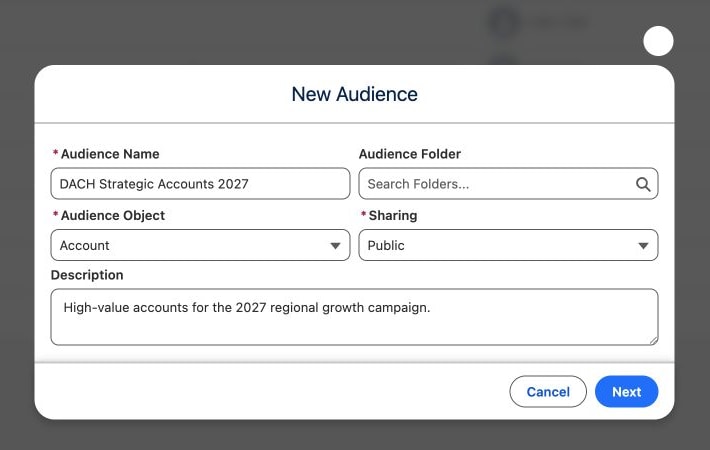
Account only appears when Account Audiences, a Professional Edition feature, is included. The initial object cannot be changed after the audience is created.
Choose a compatible activation
Section titled “Choose a compatible activation”- Add to Campaign, Split, and Campaign schedules require Salesforce’s Accounts as Campaign Members capability or Person Accounts. With neither, CAB disables the action or shows Enable “Accounts As Campaign Members” in the Salesforce Setup before scheduling an Account Audience.
- When Account audiences can be added to Campaigns and the Marketing Cloud integration is available, Add to Data Extension can map Account fields to compatible Data Extension columns.
- Organization-specific Final Actions are offered only when their template and permissions support the audience.
- Overlap Analysis only compares the audience with another Account audience.
If Person Accounts are enabled, CAB adds each Person Account to a Campaign through its contact. With Accounts as Campaign Members, business accounts are added to the Campaign as accounts. Without it, CAB adds only the Person Accounts and skips business accounts; Add to Campaign and Split then say Business accounts are skipped; person accounts are added through their contact. The results list still shows the accounts themselves.