

Review large membership changes before actions run
Catch an unexpected membership swing before it activates
A scheduled run can alert an approver—or pause all of its scheduled actions—when total churn (joiners plus leavers) crosses the schedule’s thresholds.
Configure a schedule
Section titled “Configure a schedule”- In the scheduling wizard, open Change approval and turn on Enable change approval.
- For When the threshold is exceeded, choose Notify only: alert the approver, scheduled actions still run or Require approval: skip this run’s scheduled actions and pause future scheduled execution until an approver decides.
- Set Change threshold (% of previous size) and Minimum change (members). Both configured thresholds must be met.
- Under Who approves, choose Specific user, Audience owner, or User who scheduled the run.
- Optionally turn on Auto-reject if no decision, then set After (hours). An expired approval is rejected — CAB never releases actions without a decision. The one exception is a hold CAB raised because it could not measure the change at all; see When the change could not be measured.
Make a decision
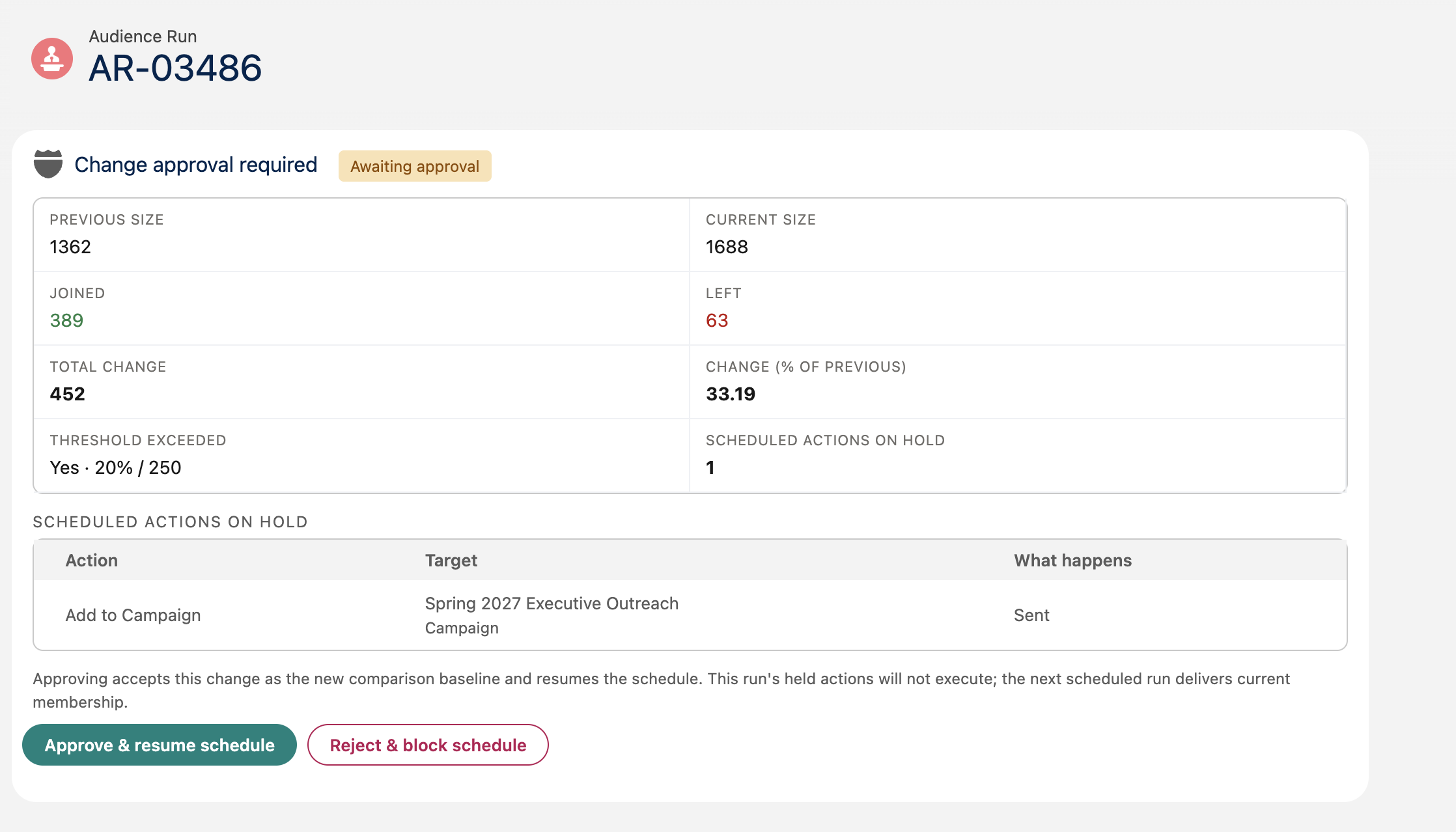
Section titled “Make a decision”A held run appears as Change approval required with status Awaiting approval. Review the previous and current sizes, joiners, leavers, churn, and held actions. Use View joined members and View left members for deeper inspection.
A scheduled sequence raises a single decision covering the whole sequence, with the figures totalled across its components. Change by component lists each component separately, so you can see which one actually moved.
Select Approve & resume schedule to accept the change and let the schedule continue, or Reject & block schedule and optionally enter Reason (optional). You can return from the notification card or the run history link Open decision.
Approving accepts the reviewed change as the new comparison baseline and resumes the schedule. The held run’s actions never execute — the next scheduled run delivers current membership, compared against the change you just accepted. If the audience was on a one-time schedule, that schedule is re-armed so the audience still delivers; the re-armed run is evaluated by the same guard, so a further unexpected change pauses it again.
Rejecting discards the held run and blocks the audience’s scheduled execution until an authorized user resumes it (see below). The comparison baseline does not advance, so an unfixed cause triggers the guard again on the next run after resuming. A configured expiry creates the same block.
If the rejected audience is used as a component of one or more audience sequences, those sequences are blocked as well, so a sequence cannot deliver the membership you just rejected. Each blocked audience is resumed separately.
While a run is waiting
Section titled “While a run is waiting”- Its scheduled actions do not run — and they never will; approval affects future runs only.
- Later scheduled runs for the same audience version are paused until the decision.
- The membership snapshot is retained for review and as the comparison baseline.
- The schedule resumes after approval, or after rejection once an authorized user unblocks it. A configured expiry auto-rejects, unless the change could not be measured.
When the change could not be measured
Section titled “When the change could not be measured”Sometimes CAB holds a run without being able to say how much the membership changed — most often because the previous membership it would compare against is no longer available, or because it could not read the approval policy that applied to the run.
The decision panel says The membership change could not be measured and explains the cause. It shows the run’s own size and the actions on hold, but no joiners, leavers, or percentage: those figures were never measured, and showing zeros would read as “nothing changed”.
What happens next depends on the cause:
- The change could not be measured. If the approval expires undecided, the run is skipped without blocking the audience. Nothing is delivered, run history records Skipped · change not measured, and the next scheduled run tries again — a temporary fault does not become a lasting block. If three consecutive runs are skipped this way, the next one is rejected for real and blocks the schedule until an authorized user resumes it. A single successfully measured run in between resets that count.
- The approval policy could not be read. An expired approval is rejected and blocks the schedule, exactly as a threshold hold does.
You can still approve or reject the run yourself at any point before it expires.
Resume after a rejection
Section titled “Resume after a rejection”After a rejection, CAB replaces the normal schedule icon with a warning icon in the audience table and on the canvas and results action bars. For a scheduled sequence, the warning also appears in the sequence header.
The schedule remains configured: CAB pauses its execution rather than unscheduling it.
The assigned approver or a CAB administrator can use either recovery route:
- Select the warning action Resume scheduled audience.
- Open Manage Schedule, then select Resume scheduled audience in the blocked-schedule warning.
Review Resume scheduled audience? and confirm.
Other users can see the blocked state on the schedule icon and in Manage Schedule, but cannot use either route to resume the schedule.
Resuming does not approve or replay the rejected run. Its remaining actions stay discarded, and the next due run recalculates the audience from fresh data. The next membership comparison uses the last accepted scheduled generation rather than the rejected generation, so CAB can request approval again when the anomaly is still present.