

Reuse filters across audiences
Define a filter once, and every audience that uses it stays consistent
Many audiences share the same building blocks: everyone who may be contacted, households that gave in the last year, people in one region. When each builder rebuilds these conditions by hand, the definitions drift apart. One audience leaves out people who opted out of email, the next one forgets. The Filter Library keeps these building blocks in one place. A curator saves a filter once as a library entry, and builders add it to their audiences instead of rebuilding it.
The library lives on the CAB Filter Library tab.
How it works
Section titled “How it works”- A curator creates an entry. The entry holds conditions on one object, optionally with related objects or a calculation over related records. See Create a library entry.
- The curator decides how fixed the entry is. A fixed entry always applies the same values. A configurable entry leaves one or more values for the builder to fill in. See Make an entry configurable.
- Builders add the entry to their audiences. In the filter editor of an audience, Copy Existing Filter lists the library entries for that object. See Use a library filter in an audience.
- An administrator can make an entry a default. CAB then adds the entry to every new filter on that object. A Locked default can also be applied to the filters that already exist. See Set defaults and enforce filters.
Words used on these pages
Section titled “Words used on these pages”| Word | What it means |
|---|---|
| Library entry | A saved filter in the Filter Library. Example: “Exclude do-not-contact” keeps only Contacts who did not opt out of email and calls. |
| Chain | An entry that also filters related objects. Example: “Active households” keeps Accounts that have a paid Gift Transaction in the last 12 months. |
| Aggregate entry | An entry that calculates over related records, such as the sum, count or maximum of a field. Example: households whose paid gifts add up to at least an amount. |
| Configurable entry | An entry with one or more parameters. The list marks it Parameterized · N. |
| Parameter | A value that the builder fills in when they add the entry, for example “Minimum total”. Everything else in the entry stays as the curator saved it. |
| Copy | The entry’s conditions are copied into the audience. The builder can edit them, and later changes to the entry do not reach the audience. |
| Sync | The audience keeps a live reference to the entry. Changes to the entry reach the audience until a builder detaches it. |
| Locked | An administrator enforces the entry. Builders can see it but cannot edit or detach it. |
| Default | An entry that CAB adds by itself to every new filter on its object, as Copy, Sync or Locked. |
Choose how an entry reaches an audience
Section titled “Choose how an entry reaches an audience”| Copy | Configure & copy | Sync | Locked | |
|---|---|---|---|---|
| Who chooses it | The builder | The builder | The builder, or an administrator through a default | An administrator |
| Works for | Fixed entries | Configurable entries | Fixed entries | Fixed entries |
| Later changes to the entry | Do not reach the audience | Do not reach the audience | Reach the audience | Reach the audience |
| Builder can edit the conditions | Yes | Yes | After Detach | No |
| Use it when | The entry is a good starting point that each audience adapts | The definition is shared, but one value differs per audience, such as an amount or a region | Every audience must follow one shared definition, and a builder may still opt out | A rule must apply to every audience without exception, such as contact preferences |
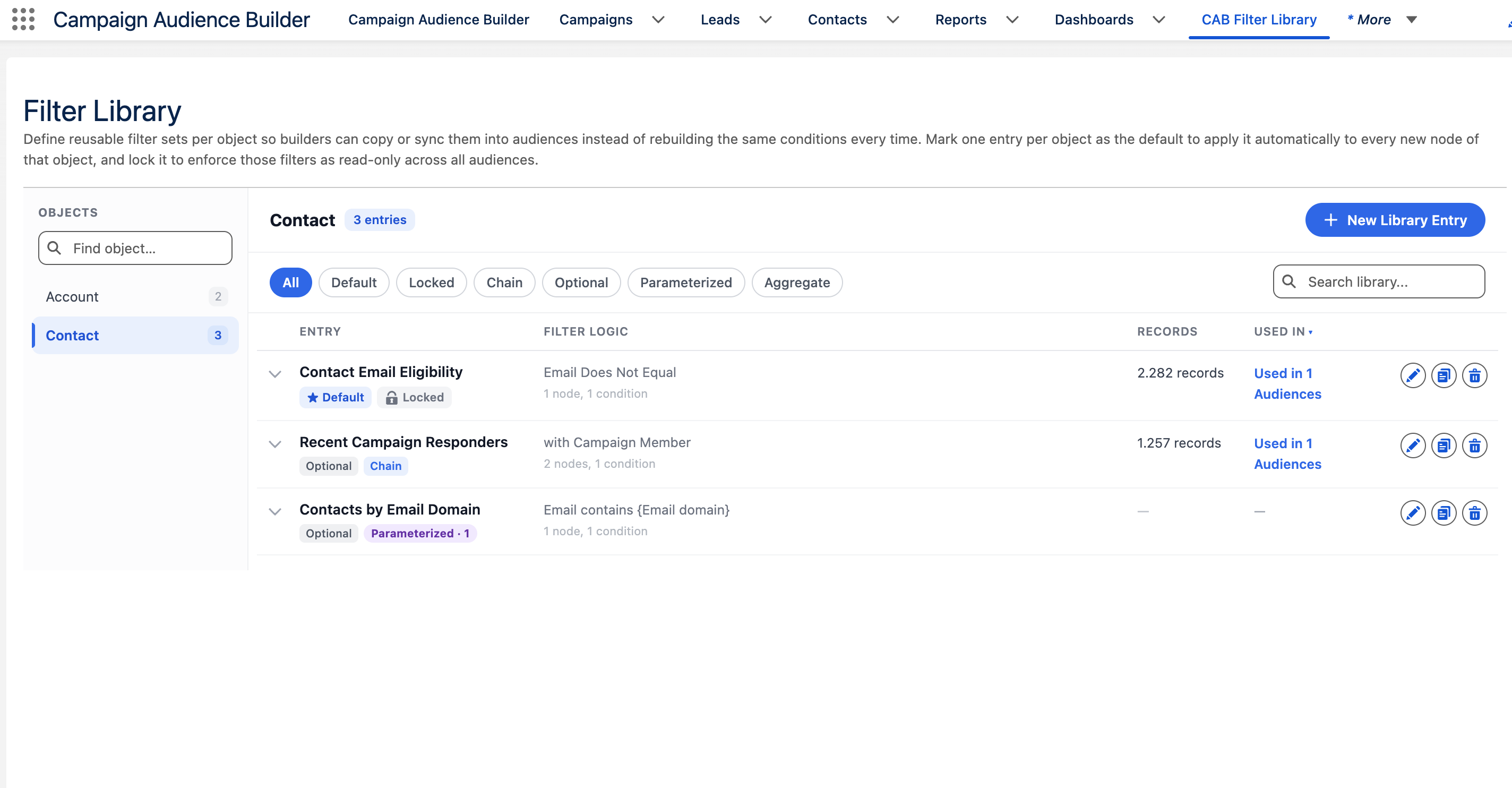
Read the library list
Section titled “Read the library list”Select an object on the left to see its entries. Find object… narrows the object list, and Search library… searches the entries, including their descriptions and parameter labels. The buttons above the list show only one kind of entry: Default, Locked, Chain, Parameterized or Aggregate.
Each entry shows its conditions under Filter logic, the number of matching records under Records, and where it is used under Used in. Select the arrow in front of an entry to see all of its conditions.
| Badge | What it means |
|---|---|
| Default · Copy | CAB copies the entry into every new filter on this object. |
| Default · Sync | CAB adds the entry to every new filter on this object as a live reference. |
| Default · Locked | CAB enforces the entry on the filters of this object. Builders cannot remove it. |
| Chain | The entry also filters related objects. |
| Aggregate | The entry calculates over related records. |
| Parameterized · N | The entry has N parameters that the builder fills in. |
| Copy-only | The entry can only be copied. Configurable entries are always copy-only. |
An entry without a Default badge is optional: CAB never adds it by itself. The default only decides what CAB adds automatically. When a builder adds a fixed entry by hand, they still choose between Copy and Sync.
A configurable entry shows no record count, because the count depends on the values a builder fills in.