

Add audience results to a Campaign
Activate a reviewed result set in Salesforce
Running an audience only calculates membership. Add to Campaign creates or updates Campaign Member records from those results.
Configure the addition
Section titled “Configure the addition”- Run the audience and select Add to Campaign from the results action bar.
- Search for a Campaign. To create one without leaving the flow, choose New Campaign, complete Create New Campaign, and select Save. That form follows your Salesforce Campaign create layout and field access.
- Choose the Member Status.
- Under Update existing campaign members?, choose one behavior:
- Keep existing member status and fields leaves existing Campaign Members unchanged.
- Update existing member status and fields applies the selected status and configured mappings to them.
- Review any optional mappings, outcomes, control group, and cleansing settings, then select Done.
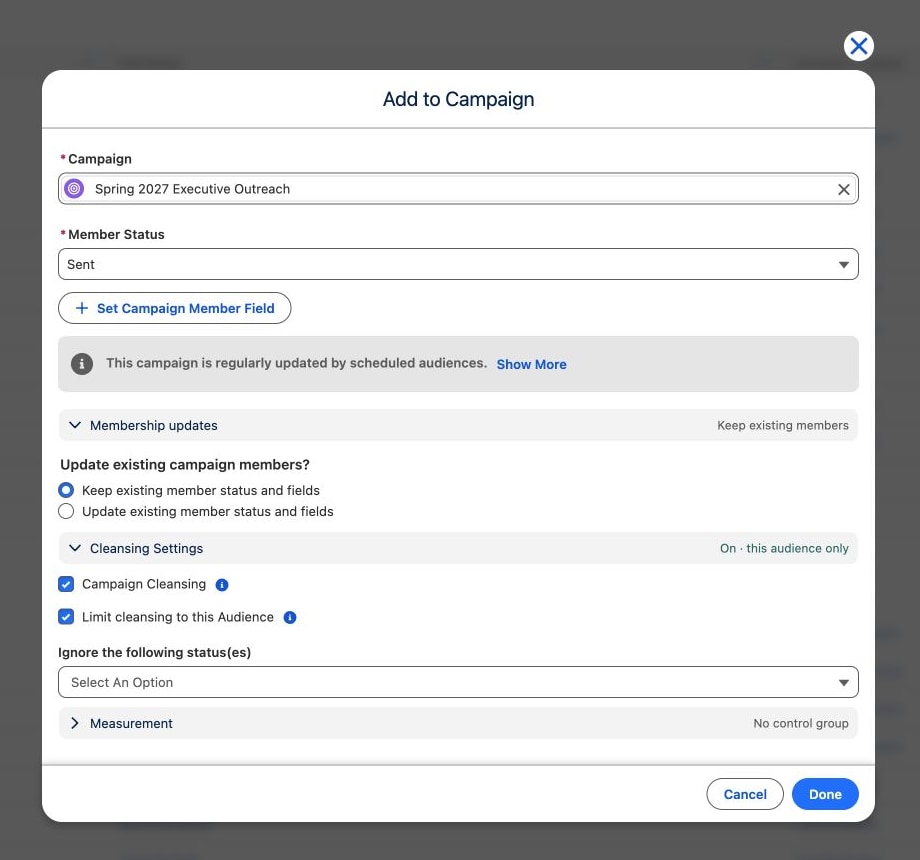
The Campaign lookup also shows existing schedules that target the selected Campaign. Review that list before creating a separate manual activation that could overlap with scheduled work.
Set Campaign Member fields
Section titled “Set Campaign Member fields”Select Set Campaign Member Field for each additional value you want CAB to populate. Choose the destination Field, then map it from one of these sources:
- an audience Record Fields value;
- a configured value under Preconfigured Data Graph Fields;
- a new related value or an aggregate calculated by the audience under Audience Data Graph;
- a constant entered after selecting Enter Fixed Value.
CAB only offers compatible source and destination field types, supports audience-field relationships up to three levels, and prevents mapping the same Campaign Member field twice. Aggregates calculated by the audience can be mapped to fields of a matching type; see Include an aggregate value. Mapping many fields adds processing work, so use the warning Updating campaign member fields has negative performance implications and should only be used if needed. as a prompt to keep the list intentional.
Measure results
Section titled “Measure results”Open Measure results to pick outcomes for this campaign add, for example whether the people you add give within 30 days. CAB counts the people this campaign add makes campaign members. See Set up an outcome.
Once you pick an outcome that counts something outside the campaign, such as a gift, you can also enter a Control group (%). CAB then keeps that share of the people out of the campaign, so you can see how many extra conversions the campaign brings. Later campaign adds to the same campaign leave the control group out until the control group’s window is over and CAB has checked its result one last time. See Measure extra conversions with a control group.
Use Campaign Cleansing carefully
Section titled “Use Campaign Cleansing carefully”Select Show Advanced to open Cleansing Settings. Campaign Cleansing removes Campaign Members that are outside the current audience before the new members are added. Cleansing a large Campaign can continue in the background; see Follow large additions in the background.
- Limit cleansing to this Audience restricts removals to members previously added by this audience.
- Ignore the following status(es) protects members with selected Campaign Member statuses.
When some members cannot be removed
Section titled “When some members cannot be removed”Automation in your organization, such as an Apex trigger or a flow, can reject the removal of a Campaign Member. CAB then keeps the removals that succeeded, still adds the new members, and lists the members that could not be removed. Those members stay in the Campaign.
- In the add-to-campaign window, CAB confirms the addition and also shows Cleansing incomplete with the number of members that could not be removed.
- A scheduled Campaign action adds its members as usual. Its next cleansing checks the whole Campaign again and retries those removals. When Cabby adds the members, it reports how many could not be removed.
- In Audience Details → Run History, Added to Campaigns shows a Failed Removals column with the count for each Campaign. The column appears only when at least one addition in the run could not remove members.

Select the count to open Failed Removals for that Campaign. It lists each member by the name of its Contact, Lead or Account and links to the Campaign Member record. When all removals failed with the same error, the error appears once above the list; when they failed with different errors, CAB lists each error with its number of members and adds an Error column. Members deleted since then, or records you cannot access, appear as Record unavailable. CAB lists up to 5,000 members per addition and states how many more could not be removed.
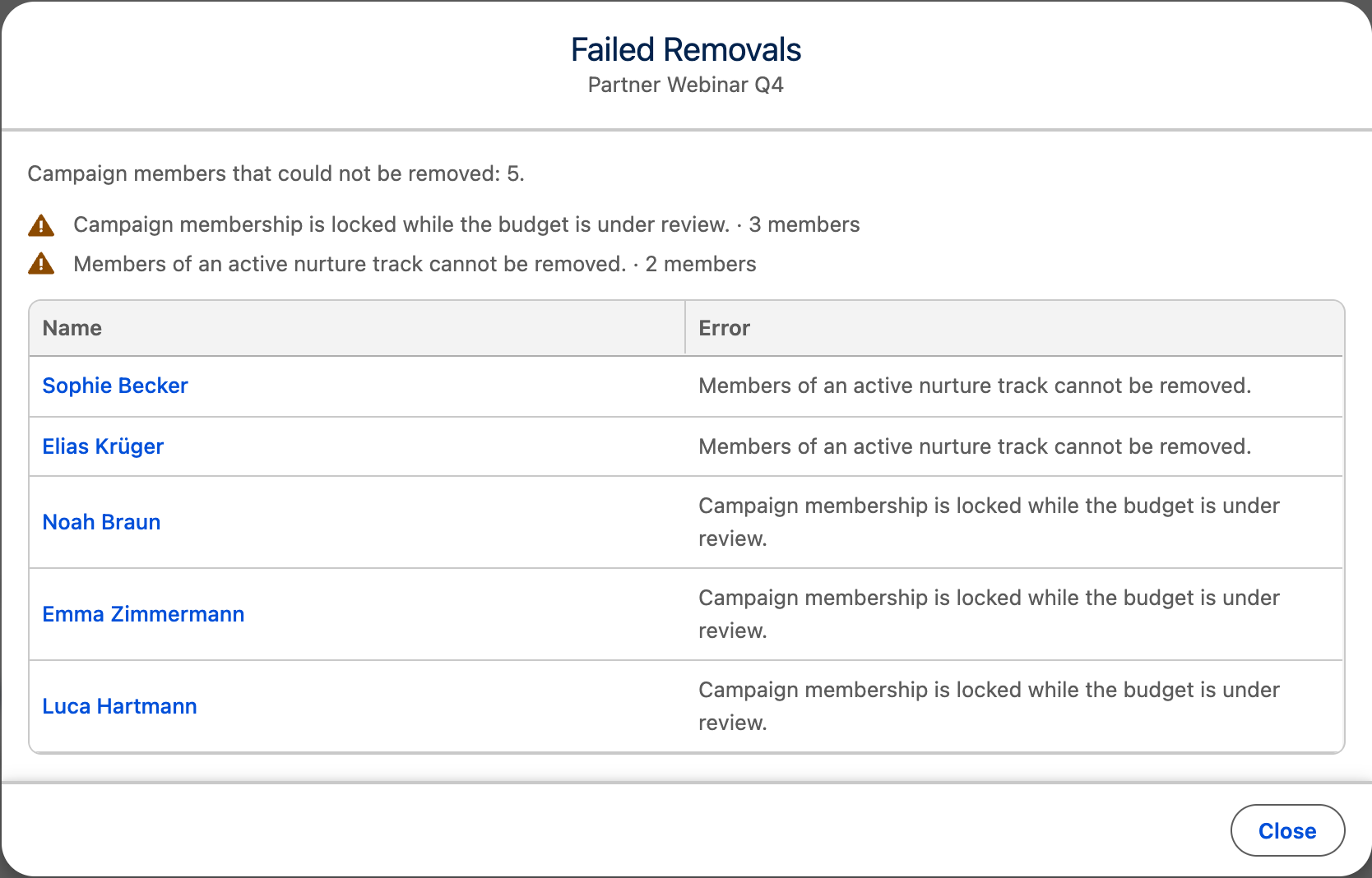
Resolve the cause, for example the automation that blocks the removal, then add the audience to the Campaign again or wait for the next scheduled run.
Follow large additions in the background
Section titled “Follow large additions in the background”Additions of 3,000 or more records—and smaller additions that reach a synchronous Salesforce limit—continue under Background operations. Once it has started, an addition cannot be cancelled from the monitor. Cleansing appears there as a Cleansing campaign step with one progress bar that never moves back and reaches 100% only when the removals have finished. If cleansing breaks off partway, the step shows Failed with Stopped before it finished. This is different from Failed Removals, where automation rejected individual removals. The removals made until then stay, but no new members are added to the Campaign in that run. On a schedule, the next run cleanses the whole Campaign again and adds the missing members by itself. If you added the audience once by hand, add it again.