

Remove duplicate records from audience results
One person, one record
When several records share an email address or a phone number, an audience can reach the same person more than once. Deduplication collapses those records to one while the audience is still being built, so every count, snapshot, and activation works from the deduplicated set.
Administrators define the rules once per object, and can exempt audiences from them in bulk. Marketers decide whether an individual audience follows them.
Choose whether an audience participates
Section titled “Choose whether an audience participates”Deduplicate this audience is offered wherever an audience is created or edited, below the Description field in each case:
- New Audience, when you create one;
- the clone dialog, when you copy an existing audience;
- Edit Properties, at any time afterwards.
The checkbox appears when active rules exist for the audience’s object, and carries a summary of each rule that will apply — for example, By Email → keeps the oldest record.
Until a rule exists, nothing is being removed from any audience of that object, so the dialog states that rather than offering a choice: No deduplication rules are active for this audience’s object, so every record is kept. Administrators also get a Manage deduplication rules link to the settings page. An audience that is already excluded keeps its checkbox either way, so a standing exclusion stays visible and can be reversed even after every rule for its object is deactivated.
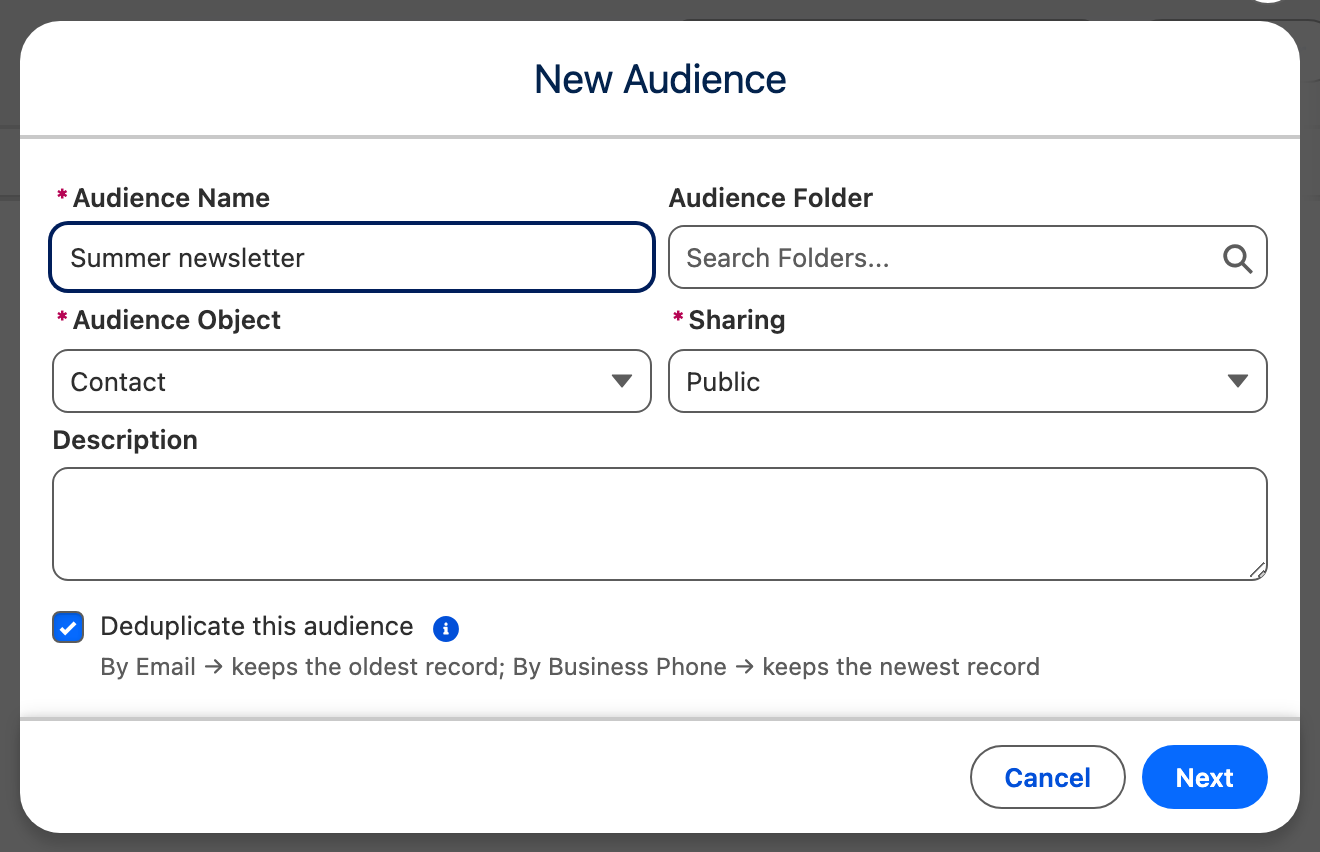
The checkbox is on by default, including on a clone — a copy makes its own choice rather than inheriting the original’s. Clear it when the audience must keep every matching record. The choice is sticky, as the field help says: The choice sticks: adding or changing rules later will not re-enrol it.
Because participating is the default, an active rule reaches every audience built on its object except the ones that turned deduplication off. A new or changed rule applies from each audience’s next run — a run already under way keeps the rules it started with.
Follow the run
Section titled “Follow the run”Deduplication is part of the run, not something that happens afterwards. While it works, the Background operations monitor shows the phase Removing duplicates. The run is not finished, and its results are not available, until that phase completes.
Expect a run to take a little longer than it did without rules. For most audiences the difference is small; audiences with many duplicates spend more time on it, because there is more to check and more to remove.
See what a run removed
Section titled “See what a run removed”Open a run in Run History. Next to Total Results, Duplicates removed reports how many records the rules took out.
When the count is above zero and the per-record details were kept, the number is a link. Select it to open Removed duplicates, which groups each kept record with the records removed in its favour:
- Record names are links to the Salesforce record. A record that can no longer be resolved — because it was deleted or is not shared with you — appears as Record unavailable.
- Outcome marks each row Kept or Removed.
- Matched on names the field that grouped the records, which matters when several rules are active.
Very large runs record a sample rather than every removal. A banner then reports how many further removals were not recorded. The count itself is always complete.
Archived runs keep their Duplicates removed count, but the per-record details are dropped once run history is trimmed. The count then carries the note The per-record details for this run are no longer retained.
How records are matched
Section titled “How records are matched”- Records are grouped by the exact stored value of the match field, including its capitalization.
Jane Doeandjane doeare two different values and are not matched to each other. - Blank values never group, so records without an email address are all kept by an email rule.
- The keep sort decides which record of a group stays. Records with no value in that field are removed, and ties are broken consistently, so the same run keeps the same record every time.
- When several rules apply to one object, they run in order and each one works on what the previous rule left.
- The rules are fixed when the run starts. Editing rules while an audience is running does not change that run; the change applies from the next run.
- In a waterfall sequence, component order takes precedence: if an earlier component already holds a value, the later component gives it up. The keep sort only decides within a component.
Matching another field case-insensitively
Section titled “Matching another field case-insensitively”Email fields are unaffected by the rule above, because Salesforce stores email addresses in lower case. Two people who typed their address differently still end up matched.
Every other field keeps what was typed, so a text, picklist, or URL field can hold Acme Corp and ACME CORP as separate values, and a rule on that field treats them as two different people.
To match one of those fields regardless of capitalization, deduplicate on a lower-case copy of it rather than on the field itself:
- Create a text field to hold the copy, for example
Company Name (lower case). - Add a before-save record-triggered flow on the object that writes the lower-cased value into it whenever the source field is set or changed.
- Run a one-time data update to fill the field on records that already exist, since the flow only fires on save.
- Choose the new field as the rule’s Match field.