

See audience size and membership change over time
Understand movement
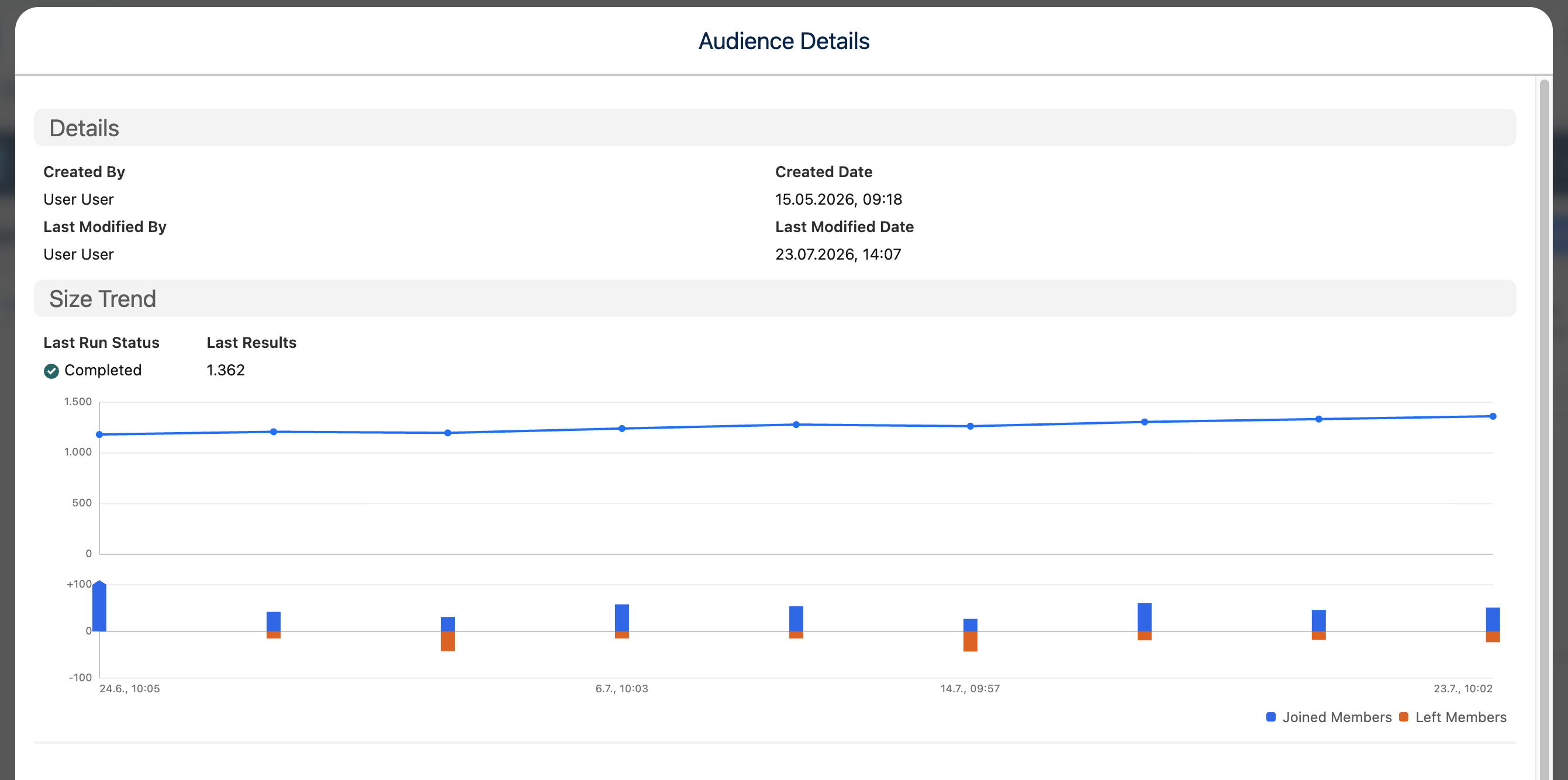
Run history now answers two different questions: “How large was this audience?” and “Who actually changed?” Size trends appear at a glance, while each eligible run records joiners and leavers against its previous baseline.
Post-run insight · Admin opt-in for member changes
Use the trend and change views
Section titled “Use the trend and change views”- Open an audience and its Run History.
- Use Size Trend to see result counts across runs. The audience list also shows the latest trend direction.
- Open a run to review its joiner/leaver flow. Choose Joined Members or Left Members when member-level inspection is available.
The first tracked run establishes a baseline, so it has no prior run to compare. A later run can also show a skipped or unavailable comparison if its baseline has expired or the definition changed in a way that prevents a trustworthy diff.
Numbers you will see
Section titled “Numbers you will see”- Total results for each run.
- Joined and left counts when tracking is active.
- Trend direction compared with the previous run.
- Run status and any comparison limitations.