

Add the Campaign Suite
After these steps, CAB users see the Campaign Suite on every Campaign record.
Before you begin
- Permission
- Permission to edit Lightning pages in Salesforce.
The Campaign Suite opens Campaign Audience Builder from a campaign and shows View History, Add Members, Schedule Audience, the audiences scheduled for the campaign and, with Outcomes, the campaign’s outcomes. It shows nothing to users without CAB access.
-
Open a Campaign record, then select the setup gear → Edit Page.
-
Under Custom - Managed, find CAB - Campaign Suite and drag it onto the page.
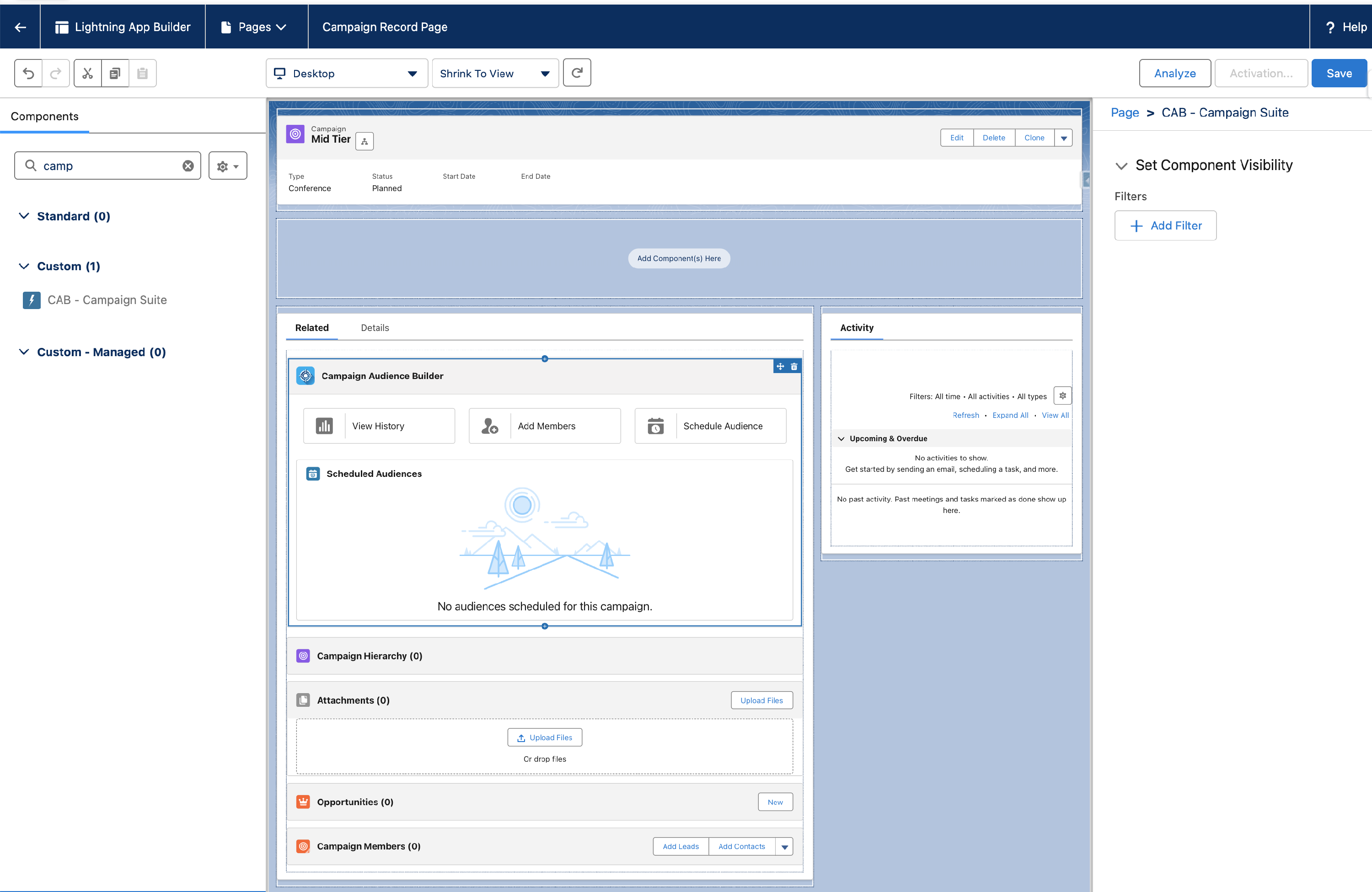
-
Select Save. If the Campaign record page has never been edited before, also select Activate and assign the page.
Check the result
Section titled “Check the result”Open a Campaign record as a CAB user. The Campaign Suite shows the Campaign Audience Builder header with its actions. A user without CAB access sees no component.